> For the complete documentation index, see [llms.txt](https://cw-systems.gitbook.io/nebula-forge/llms.txt). Markdown versions of documentation pages are available by appending `.md` to page URLs; this page is available as [Markdown](https://cw-systems.gitbook.io/nebula-forge/welcome.md).
# Welcome
If you're viewing the offline pdf documentation, view the latest online documentation [**HERE**](https://cw-systems.gitbook.io/nebula-forge)**.**
The Ultimate Nebula Rendering System
This asset is designed to work in Unity 2021 LTS, Unity 2022 LTS, Unity 2023, and Unity 6, with the Built-In Render Pipeline, URP, and HDRP.
All example scenes are in the **"Plugins/CW/Nebula Forge/Scenes"** folder. These show you what fully configured nebulae look like.
## Required Packages
{% hint style="danger" %}
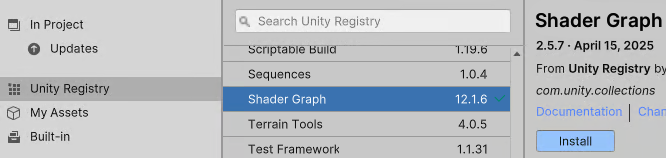
Your project must have the **Shader Graph** package installed.
{% endhint %}
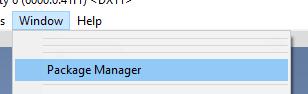
Package Installation Guide
### Open: Window / Package Manager
### Install Package: Shader Graph
## **Done!**
## Making Your Own Nebula
To make your own nebula from scratch, you can either:
* Right click in the **Hierarchy** tab, and select **"CW / Nebula Forge / Nebula (Radius = 500)"**.
* Go to the menu bar, and select **"GameObject / CW / Nebula Forge / Nebula (Radius = 500)"**.
This will create a new GameObject called **"Nebula"** with the [**SgtNebulaRenderer** ](/nebula-forge/components/sgtnebularenderer.md)component.
Begin by changing the GameObject name, and then click the **"Duplicate Settings Material"** button in the inspector. The duplicated material will be given the same name as your GameObject, and it will be placed in your project files.
{% hint style="info" %}
You can click the **SettingsMaterial** setting to find the material in your project files.
{% endhint %}
You should now see the nebula in your scene. If not, you can adjust the Transform position values or your nebula or camera until it's in view.
{% hint style="warning" %}
By default, the nebula uses the camera's depth texture to clip against foreground geometry. If there is no depth texture, then the nebula may not be visible. In HDRP the depth texture is always enabled so it's not an issue, but in URP and BiRP this is optional.
If you want to enable the camera depth texture then you can add the **CwDepthTextureMode** component to your camera, and set **DepthMode = Depth**.
If you don't want depth clipping, then change the **SgtNebulaRenderer** component's **NebulaMaterial** setting from **"Nebulae + Depth Clip"** to **"Nebulae"**.
{% endhint %}
You can now change the look of your nebula.
A good place to start is by clicking the **"Randomize Texture"** and **"Randomize Colors"** and **"Randomize Shape"** buttons. These will adjust the main settings of the material.
For full settings, you can click the **SettingsMaterial** setting. You can find more information of all these settings [**HERE**](/nebula-forge/components/planetarynebula.md).
---
# Agent Instructions
This documentation is published with GitBook. GitBook is the documentation platform designed so that both humans and AI agents can read, navigate, and reason over technical content effectively. Learn more at gitbook.com.
## Querying This Documentation
If you need additional information that is not directly available in this page, you can query the documentation dynamically by asking a question.
Perform an HTTP GET request on the current page URL with the `ask` query parameter, and the optional `goal` query parameter:
```
GET https://cw-systems.gitbook.io/nebula-forge/welcome.md?ask=&goal=
```
`ask` is the immediate question: it should be specific, self-contained, and written in natural language.
`goal` is optional and describes the broader end goal you are ultimately trying to accomplish on behalf of the user. GitBook uses it to tailor the answer towards what is most useful for that goal.
The response will contain a direct answer to the question and relevant excerpts and sources from the documentation.
Use this mechanism when the answer is not explicitly present in the current page, you need clarification or additional context, or you want to retrieve related documentation sections.